Building Homi’s CLI with oRPC and Cloudflare Forge
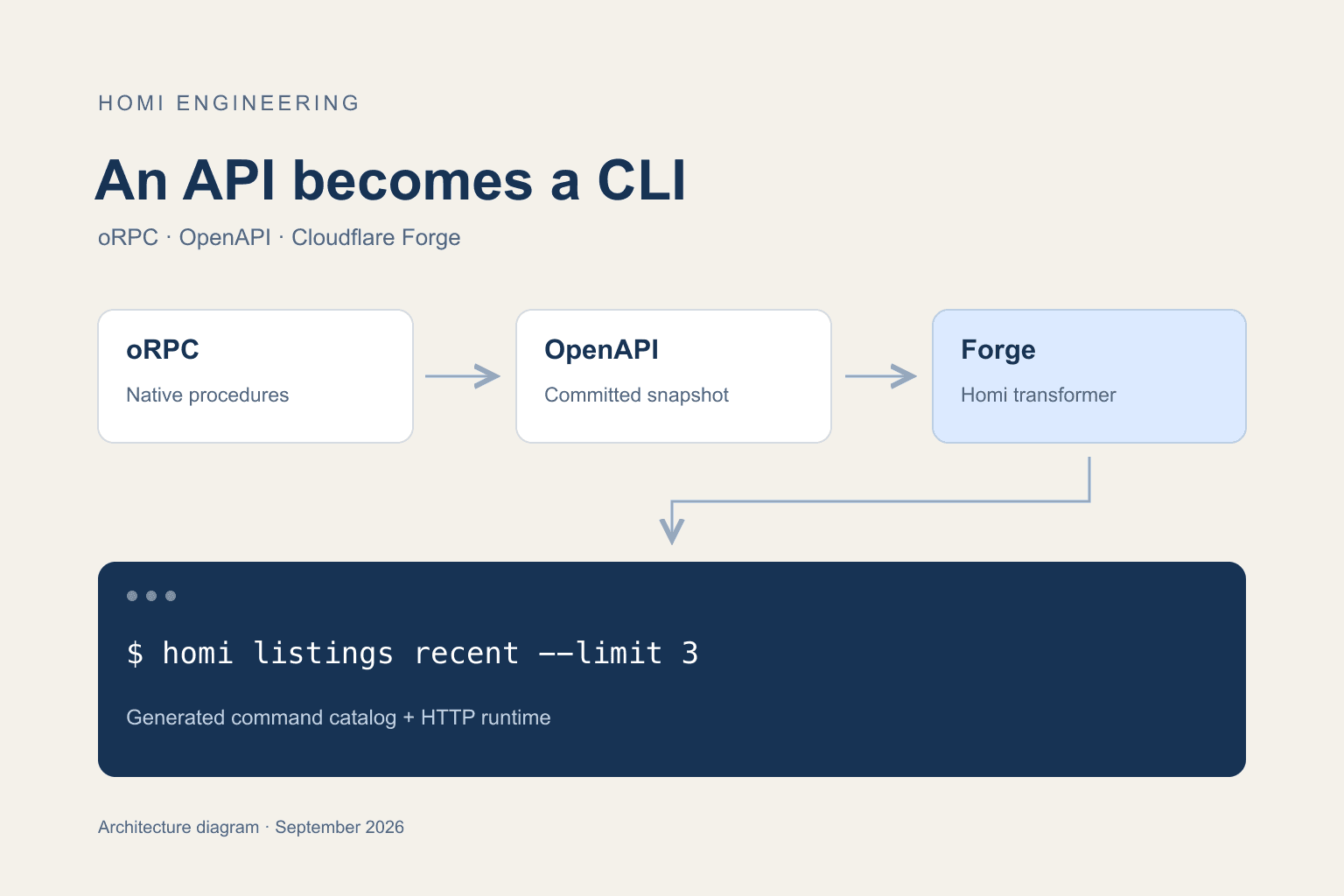
Our native API already exported OpenAPI. We used Forge to turn that contract into a command catalog, then built a runtime for authentication and HTTP requests.
kristian
Engineer
6 min read
#orpc#openapi#cloudflare-forge#cli
Homi keeps property searches in shared collections. During debugging, we often need to inspect a collection or check whether an import has finished. Our native app already had HTTP endpoints for that work, with an OpenAPI document generated from oRPC.
When Cloudflare introduced Forge, we wanted to use that document as its input. We built a Homi-specific Forge transformer, connected the output to a CLI runtime, and ran the resulting executable against our development environment:
Both returned existing data. The CLI currently lives in our private repository and requires Node 24 or newer. The examples below use that internal build; public npm distribution is still pending.
Start with the API contract
Our native OpenAPI document describes ten operations for collections, listing imports and reads, deletion, and tour media. oRPC generates it from the native procedures and their schemas. Its OpenAPI generator gave us the input we needed for Forge.
We kept the CLI's scope tied to that exported surface. Broader Homi capabilities, such as editing the story behind a property search, would need an exported operation before this CLI could generate a command for them.
The CLI calls the existing native API at /api/native/v1. Collection permissions and business logic continue to run on the server. Adding the CLI required no changes to those endpoints.
Give Forge a CLI transformer
Forge provides the generation pipeline and helpers for resolving OpenAPI operations. We supplied the transformer that decides what a Homi command looks like.
Our generator initializes Forge with the document and invokes that transformer:
Inside the transformer, forge.getOperationIds() enumerates the operations. resolveOperation(operationId) supplies the HTTP method and path, along with parameter information. We also use resolveDocRef for request bodies and parameters that use references.
The catalog retains the route and request schema for each operation. Parameter names become kebab-case flags, so collectionId becomes --collection-id. An operation without an alias gets a command name derived from its operation ID.
The transformer emits two files through forge.emit: a JSON catalog consumed by the runtime and a Markdown command reference. That keeps the documented flags attached to the same generation step as the executable's command definitions.
There was one compatibility adjustment. Our oRPC document uses inline schemas, so it can omit components.schemas. The pinned Forge version requires that field. Before initialization, we supply an empty map when it is absent:
We pinned Forge from upstream commit 00b8ede, packaging its source with the Apache license. The npm package was unavailable when we built this on September 29, 2026. Forge is a development dependency; the bundled CLI runs without it.
Inspect the contract behind the commands
Open Homi's native OpenAPI document to see the operations and request schemas that feed our Forge transformer.
Public schema: Read the contract without signing in.
Native API: Inspect the collection and listing operations used by this CLI.
The generated catalog tells the runtime how to construct each API request. We wrote the runtime code for flag parsing, authentication, and HTTP execution. Ajv validates inputs against the emitted JSON schemas before a request leaves the process.
Successful commands write JSON to stdout. Errors go to stderr, with exit codes that distinguish invalid usage from a request failure. That makes the output usable in shell scripts while retaining the server's response shape.
Imports return a receipt. The caller can use its ID to check progress:
# Replace these placeholders with IDs from your account.
homi listings import \
  --collection-id COLLECTION_ID \
  --url https://example.com/home \
  --dry-run

homi imports status \
  --collection-id COLLECTION_ID \
  --import-id IMPORT_ID
The first command above is a preview. --dry-run validates and prints the request without sending it, and works without credentials. Removing the flag submits the import. Polling remains explicit: each command makes one request, so a script controls its own retry interval.
DELETE operations require --yes. Multipart commands read a local file and build the upload request from the generated field definitions. We exercised those paths against a test server before using the executable with an existing account.
Authentication follows the native API
The native API accepts Better Auth session tokens. Homi's MCP connector has its own OAuth flow and token audience, so an MCP OAuth token cannot authenticate these requests.
Email/password login uses the native authentication flow:
homi auth login --email you@example.com
homi auth status
The password prompt disables terminal echo. Automation can supply a password or an existing session token through stdin. Browser-based OAuth login is future work, which leaves an extra setup step for accounts that use social sign-in.
Stored credentials are scoped to the server origin. The credential directory uses mode 0700, and files use 0600. Authenticated requests reject redirects. Logging out removes the local credential file; the server session remains valid until expiration or revocation.
One small implementation detail deserved a test: stdin handling removes one trailing line ending. Trimming all trailing whitespace would change a password that intentionally ends with a space.
Keep regeneration reviewable
We commit the OpenAPI snapshot used for generation. A build can therefore run offline, and a review can show the schema change alongside its generated commands.
After changing the native API, we refresh from the development server running that branch:
generate:check verifies that the committed catalog and reference match the committed snapshot. Refreshing that snapshot is still an explicit step. Changes to the oRPC source or the live endpoint can go unnoticed by this check until the snapshot is updated.
The snapshot also carries the server URL used as the CLI default. We inspect that value when preparing a release so a development refresh cannot silently redirect the released CLI to a development environment.
What we verified
The transformer test adds a synthetic operation with a referenced body schema, then checks that Forge emits a command for it. That tests the reason for using generation: a new supported operation can appear without a dedicated command implementation.
Our executable tests run the built bundle against a loopback HTTP server. They cover the login lifecycle and credential permissions, plus request validation and payload handling. Import polling and confirmed deletion are exercised there, including error responses and rejected redirects.
For the live smoke test, we obtained a temporary development session, logged in through --token-stdin, and checked the authenticated identity. Listing collections worked. A second read returned three recent listing receipts, and an import dry run produced the expected request preview. We then cleared the temporary local credentials.
Live mutation behavior and production email/password login remain unverified in that smoke test. The current CLI covers the ten native operations exported in our snapshot. Public distribution and browser login are the next pieces needed for a broader release.
Connect your AI tools to Homi
Use Homi's available MCP connector to work with your property search from a compatible AI client. The developer guide walks through connection and OAuth setup.
Your account: Authorize access through Homi's OAuth flow.
Existing collections: Work with the homes you have saved in Homi.
Kristian builds Homi to help people search for a home together. He writes about the decisions that happen between saving a listing and choosing where to live, drawing on his own home search and his work on the product.
How we built a campaign-ready sync system for Loops that computes dynamic user segments on-demand without polluting our database schema or scattering one-off updates throughout our codebase.
Remember when we redesigned our Add Property dialog and wrote about it? Turns out that design also didn't survive. Here's how we got it right (this time, we think).
How we rebuilt our 'Add Property' dialog three times in one session based on real user feedback. A case study in iterative design and the importance of staying flexible.
#engineering#ui-design#user-feedback#iteration
Want our product updates? Sign up for our newsletter.


 Kristian Elset Bø