A property conversation can begin in an AI chat and pick up details fast. You discuss a move, compare rentals, or plan a short stay. When you return, a promising link may be in one chat, notes in another, and the reason a home stood out is harder to find.
Homi gives the search a private place to live. A collection holds saved homes, the context behind the search, and the decisions made as the shortlist changes. Later conversations can return to that record and continue from the same information.
Start one search you will return to
Start with one real search: a home you may buy, a rental you are considering, or a short stay you are planning. Create a private Homi collection and choose the search type. Add facts you have already stated, such as a location, dates, or who is travelling.
The collection gives later conversations one place to read and update the search story, priorities, key locations, saved homes, and trip plans where they apply. As plans change, you can ask an assistant to read the collection or make a requested update through Homi.
A collection keeps the context
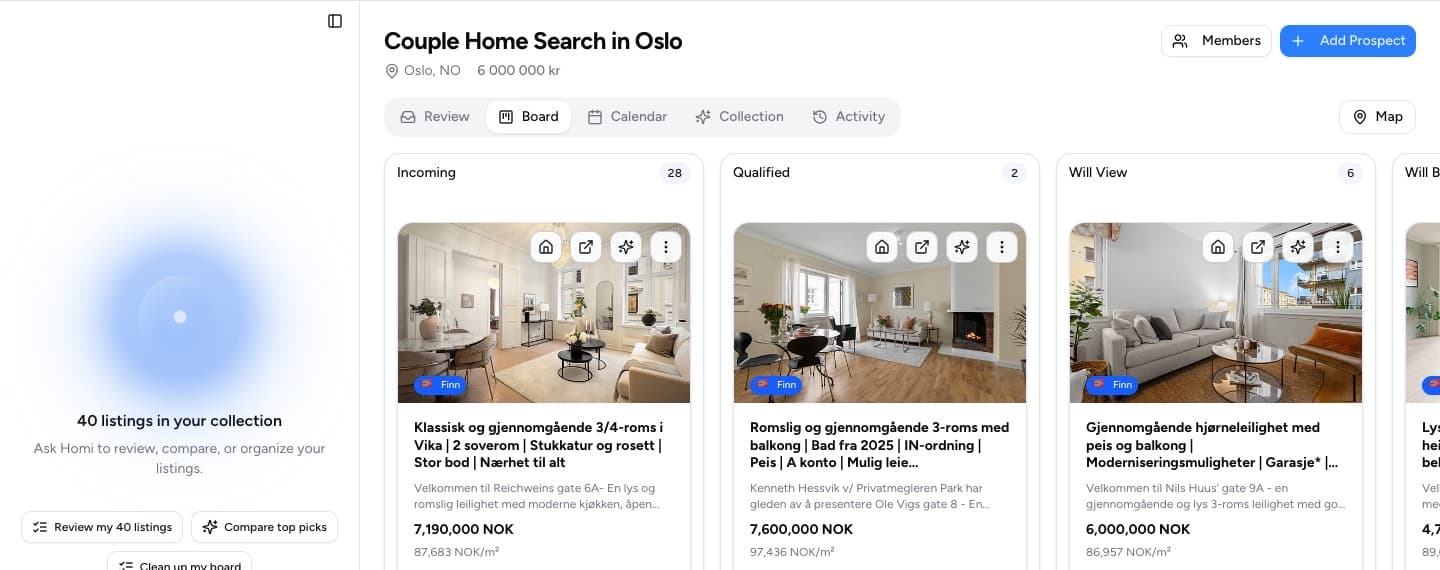
Each saved home stays with the collection where you are deciding. Homi keeps the search story beside the shortlist and can use that context when you compare homes or read an evaluation. Notes, locations, images, and decision stages remain attached to that search.
When the shortlist becomes a set of tradeoffs, you can return to a home and see what was saved about it.
A Homi collection keeps the shortlist and each decision stage together.
The assistant researches, Homi keeps the record
Your assistant can research properties in its own browser or through a marketplace connector you have authorized. Once you choose a property, Homi can import that individual URL or save facts supplied to it. The resulting record can include the listing, images, and evaluation in your collection.
Homi's public connector does not search or scrape listing marketplaces. It does not expose Homi's internal agent. The assistant handles research, and Homi keeps the property record after you choose to add it to the search.
Private access and a readable view
Homi uses OAuth. When an assistant connects to Homi, it sends you to Homi to sign in and approve access. Homi checks access to a collection every time a tool call uses that collection.
A compatible assistant can show Homi's visual collection view with saved homes and comparisons. The view is read-only. When you request a change, the assistant sends it through Homi's typed tools, where the write remains model-mediated.
Connect when your assistant offers Homi
Homi's single production connection is https://www.homi.so/api/mcp. Directory availability depends on acceptance being complete. Until then, Homi is not presented as a public directory connection.
Development-plugin access belongs to Homi's internal acceptance flow. It is not a public tester route.
Kristian builds Homi to help people search for a home together. He writes about the decisions that happen between saving a listing and choosing where to live, drawing on his own home search and his work on the product.
A practical comparison of property flipping in the USA and Norway: deal structure, renovation risk, taxes, transaction costs, and resale documentation.
After viewing 30+ properties, everything blurs together. This isn't failure. It's a known psychological phenomenon. Learn why our brains struggle with extensive searches and how to beat decision fatigue.
House hunting is a team sport with dozens of moving parts. Learn how a simple kanban board turns the chaos into a calm, repeatable workflow you can run for any search: buying, long-term renting, or short-term stays.
#workflow#productivity
Want our product updates? Sign up for our newsletter.



 Kristian Elset Bø